In this part we are going to create a client application which connects two users using signalling server we created in the previous part.
Visual structure:
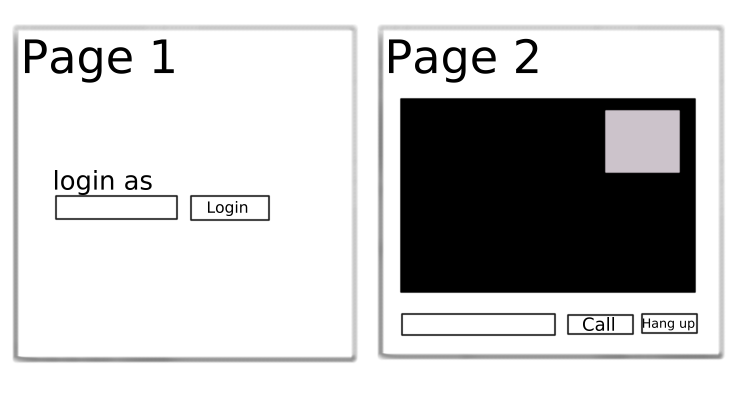
There will be 2 pages in our app: one for login and another for calling a user.
To start, let’s create a basic HTML page index.html:
Login As

Login

Call
Hang Up
Create the client.js file:
//our user
var name;
//user connected to us
var connectedUser;

//setup a connection to websocket server
var connection = new WebSocket('ws://localhost:9090');

connection.onopen = function(){
    console.log("Connected");
};

//handling messages we got from the server
connection.onmessage = function(message){

    console.log("Got message", message.data);

    var data = JSON.parse(message.data);

    switch(data.type){
        //check for login success
        case "login":
            onLogin(data.success);
            break;
        //when a user wants to connect to us
        case "offer":
            onOffer(data.offer, data.name);
            break;
        //when we send offer to a user and he send back an answer to us
        case "answer":
            onAnswer(data.answer);
            break;
        //when remote user sends us an ice candidate
        case "candidate":
            onCandidate(data.candidate);
            break;
        //when remote user leaves us
        case "leave":
            onLeave();
            break;
        default:
            break;
    }

};

connection.onerror = function(err){
    console.log("Got error", err);
};

//alias for sending messages in json format
function send(message){
    if(connectedUser){
        message.name = connectedUser;
    }
    connection.send(JSON.stringify(message));
}
Let’s implement a simple login auth. We will simply send a username to the server which will tell if the username has been taken or not. Add the following code:
//Login implementation
var loginPage = document.querySelector('#login-page'),
    usernameInput = document.querySelector('#username'),
    loginButton = document.querySelector('#login'),
    callPage = document.querySelector('#call-page'),
    theirUsernameInput = document.querySelector('#their-username'),
    callButton = document.querySelector('#call'),
    hangUpButton = document.querySelector('#hang-up');

//initially hide call page in order to show login page first
callPage.style.display = 'none';

//Login when the user clicks the button "login"
loginButton.addEventListener('click', function(event){
    name = usernameInput.value;
    if(name.length > 0){
        send({
            type: "login",
            name:name
        });
    }
});

function onLogin(success){
    if(success === false){
        alert("Login unsuccessful, please try a different name.");
    } else {
        //if login was successful
        loginPage.style.display = "none";
        callPage.style.display = "block";
        //set up requirements for maling a webrtc connection
        startConnection();
    }
}
In the startConnection function we will:
1. Obtain a video stream from the camera
2. Check if the user’s device supports WebRTC
3. Create the RTCPeerConnection object
Add the following code:
//Starting a peer connection
var yourVideo = document.querySelector('#yours'),
    theirVideo = document.querySelector('#theirs'),
    yourConnection, stream;

function startConnection(){

    //if the user's device supports webrtc
    if(hasUserMedia()){
        navigator.getUserMedia({video: true, audio: true}, function(myStream){
            stream = myStream;
            //add local stream in the top right corner
            yourVideo.src = window.URL.createObjectURL(stream);

            if(hasRTCPeerConnection()){
                setupPeerConnection(stream);
            } else {
                alert("Sorry, your browser does not support WebRTC");
            }

        }, function(error){
            console.log(error);
        })
    } else {
        alert("Sorry, your browser does not support WebRTC");
    }

}

function setupPeerConnection(stream){
    var configuration = {
        "iceServers":[{"url":"stun:stun.1.google.com:19302"}]
    };
    yourConnection  = new RTCPeerConnection(configuration);

    //Setup stream listening
    yourConnection.addStream(stream);
    yourConnection.onaddstream = function(e){
        theirVideo.src = window.URL.createObjectURL(e.stream);
    };

    //setup ice handling
    //sending ice candidate to another user
    yourConnection.onicecandidate = function(event){
        console.log("onicecandidate");
        if(event.candidate){
            send({
                type: "candidate",
                candidate: event.candidate
            });
        }
    };

}

//check if the user's device supports webrtc
function hasUserMedia(){
    navigator.getUserMedia = navigator.getUserMedia || navigator.webkitGetUserMedia
        || navigator.mozGetUserMedia || navigator.msGetUserMedia;
    return !!navigator.getUserMedia;
}

//check if the user's device supports rtcpeerconnection object
function hasRTCPeerConnection(){
    window.RTCPeerConnection = window.RTCPeerConnection || window.webkitRTCPeerConnection
        || window.mozRTCPeerConnection;
    window.RTCSessionDescription = window.RTCSessionDescription || window.webkitRTCSessionDescription
        || window.mozRTCSessionDescription;
    window.RTCIceCandidate = window.RTCIceCandidate || window.webkitRTCIceCandidate
        || window.mozRTCIceCandidate;
    return !!window.RTCPeerConnection;
}
Now if you run the server and open a client app you will see your local stream in the top right corner of the screen.
Now we are ready to implement a calling function. The scheme is:
1. UserA send the offer to UserB
2. Once UserB receives the offer he sends the answer back
3. They both start trading ICE candidates
Add the following code:
//Initiating a call to the other user
callButton.addEventListener("click", function(){
    var theirUsername = theirUsernameInput.value;
    if(theirUsername.length > 0){
        startPeerConnection(theirUsername);
    }
});

//sending offer and starting ice candidates trading
//remember this process is asynchronous
function startPeerConnection(user){

    connectedUser = user;

    //begin the offer
    yourConnection.createOffer(function(offer){
        send({
            type: "offer",
            offer: offer
        });
        yourConnection.setLocalDescription(offer);
    }), function(error){
        alert("An error has occured.");
    };

}

//when we receive an offer from another user
function onOffer(offer, name){
    connectedUser = name;
    yourConnection.setRemoteDescription(new RTCSessionDescription(offer));

    yourConnection.createAnswer(function(answer){
        yourConnection.setLocalDescription(answer);
        send({
            type: "answer",
            answer: answer
        });
    }, function(error){
        alert("An error has occured");
    });

}

//when we got an answer to our offer
function onAnswer(answer){
    yourConnection.setRemoteDescription(new RTCSessionDescription(answer));
}

//when we got ice candidate from a user we save it
function onCandidate(candidate){
    console.log("oncandidate");
    yourConnection.addIceCandidate(new RTCIceCandidate(candidate));
}
Now if you open the client app in two tabs in your browser, login 2 users and try to call to another user you may see local and remote streams on the web page. If something goes wrong you may navigate(in Chrome) to View->Developer->Developer Tools, open the Network tab and inspect the traffic for errors.
The last feature is hanging up an in-progress call. Add the following code:
//Hanging up a call
//send the other user a leave message and destroy a connection
hangUpButton.addEventListener("click", function(){
    send({
        type: "leave"
    });
    onLeave();
});

function onLeave(){
    connectedUser = null;
    theirVideo.src = null;
    //close rtcpeerconnection and stop transmitting our stream to the other user
    yourConnection.close();
    yourConnection.onicecandidate = null;
    yourConnection.onaddstream = null;
    //setup rtcpeerconnection again to accept new calls
    setupPeerConnection(stream);
}
This is out entire client application, client.js file:
//our user
var name;
//user connected to us
var connectedUser;

//setup a connection to websocket server
var connection = new WebSocket('ws://localhost:9090');

connection.onopen = function(){
    console.log("Connected");
};

//handling messages we got from the server
connection.onmessage = function(message){

    console.log("Got message", message.data);

    var data = JSON.parse(message.data);

    switch(data.type){
        //check for login success
        case "login":
            onLogin(data.success);
            break;
        //when a user wants to connect to us
        case "offer":
            onOffer(data.offer, data.name);
            break;
        //when we send offer to a user and he send back an answer to us
        case "answer":
            onAnswer(data.answer);
            break;
        //when remote user sends us an ice candidate
        case "candidate":
            onCandidate(data.candidate);
            break;
        //when remote user leaves us
        case "leave":
            onLeave();
            break;
        default:
            break;
    }

};

connection.onerror = function(err){
    console.log("Got error", err);
};

//alias for sending messages in json format
function send(message){
    if(connectedUser){
        message.name = connectedUser;
    }
    connection.send(JSON.stringify(message));
}

//Login implementation
var loginPage = document.querySelector('#login-page'),
    usernameInput = document.querySelector('#username'),
    loginButton = document.querySelector('#login'),
    callPage = document.querySelector('#call-page'),
    theirUsernameInput = document.querySelector('#their-username'),
    callButton = document.querySelector('#call'),
    hangUpButton = document.querySelector('#hang-up');

//initially hide call page in order to show login page first
callPage.style.display = 'none';

//Login when the user clicks the button "login"
loginButton.addEventListener('click', function(event){
    name = usernameInput.value;
    if(name.length > 0){
        send({
            type: "login",
            name:name
        });
    }
});

function onLogin(success){
    if(success === false){
        alert("Login unsuccessful, please try a different name.");
    } else {
        //if login was successful
        loginPage.style.display = "none";
        callPage.style.display = "block";
        //set up requirements for maling a webrtc connection
        startConnection();
    }
}

//Starting a peer connection
var yourVideo = document.querySelector('#yours'),
    theirVideo = document.querySelector('#theirs'),
    yourConnection, stream;

function startConnection(){

    //if the user's device supports webrtc
    if(hasUserMedia()){
        navigator.getUserMedia({video: true, audio: true}, function(myStream){
            stream = myStream;
            //add local stream in the top right corner
            yourVideo.src = window.URL.createObjectURL(stream);

            if(hasRTCPeerConnection()){
                setupPeerConnection(stream);
            } else {
                alert("Sorry, your browser does not support WebRTC");
            }

        }, function(error){
            console.log(error);
        })
    } else {
        alert("Sorry, your browser does not support WebRTC");
    }

}

function setupPeerConnection(stream){
    var configuration = {
        "iceServers":[{"url":"stun:stun.1.google.com:19302"}]
    };
    yourConnection  = new RTCPeerConnection(configuration);

    //Setup stream listening
    yourConnection.addStream(stream);
    yourConnection.onaddstream = function(e){
        theirVideo.src = window.URL.createObjectURL(e.stream);
    };

    //setup ice handling
    //sending ice candidate to another user
    yourConnection.onicecandidate = function(event){
        console.log("onicecandidate");
        if(event.candidate){
            send({
                type: "candidate",
                candidate: event.candidate
            });
        }
    };

}

//check if the user's device supports webrtc
function hasUserMedia(){
    navigator.getUserMedia = navigator.getUserMedia || navigator.webkitGetUserMedia
        || navigator.mozGetUserMedia || navigator.msGetUserMedia;
    return !!navigator.getUserMedia;
}

//check if the user's device supports rtcpeerconnection object
function hasRTCPeerConnection(){
    window.RTCPeerConnection = window.RTCPeerConnection || window.webkitRTCPeerConnection
        || window.mozRTCPeerConnection;
    window.RTCSessionDescription = window.RTCSessionDescription || window.webkitRTCSessionDescription
        || window.mozRTCSessionDescription;
    window.RTCIceCandidate = window.RTCIceCandidate || window.webkitRTCIceCandidate
        || window.mozRTCIceCandidate;
    return !!window.RTCPeerConnection;
}

//Initiating a call to the other user
callButton.addEventListener("click", function(){
    var theirUsername = theirUsernameInput.value;
    if(theirUsername.length > 0){
        startPeerConnection(theirUsername);
    }
});

//sending offer and starting ice candidates trading
//remember this process is asynchronous
function startPeerConnection(user){

    connectedUser = user;

    //begin the offer
    yourConnection.createOffer(function(offer){
        send({
            type: "offer",
            offer: offer
        });
        yourConnection.setLocalDescription(offer);
    }), function(error){
        alert("An error has occured.");
    };

}

//when we receive an offer from another user
function onOffer(offer, name){
    connectedUser = name;
    yourConnection.setRemoteDescription(new RTCSessionDescription(offer));

    yourConnection.createAnswer(function(answer){
        yourConnection.setLocalDescription(answer);
        send({
            type: "answer",
            answer: answer
        });
    }, function(error){
        alert("An error has occured");
    });

}

//when we got an answer to our offer
function onAnswer(answer){
    yourConnection.setRemoteDescription(new RTCSessionDescription(answer));
}

//when we got ice candidate from a user we save it
function onCandidate(candidate){
    console.log("oncandidate");
    yourConnection.addIceCandidate(new RTCIceCandidate(candidate));
}

//Hanging up a call
//send the other user a leave message and destroy a connection
hangUpButton.addEventListener("click", function(){
    send({
        type: "leave"
    });
    onLeave();
});

function onLeave(){
    connectedUser = null;
    theirVideo.src = null;
    //close rtcpeerconnection and stop transmitting our stream to the other user
    yourConnection.close();
    yourConnection.onicecandidate = null;
    yourConnection.onaddstream = null;
    //setup rtcpeerconnection again to accept new calls
    setupPeerConnection(stream);
}
Of course there’s a lot to do to make this app better, like checking user input at each part or handling not having enough bandwidth to stream a video call or handling not being able to traverse firewalls or something else. This is just a basic WebRTC application.
That’s all for today :)